Routing rules
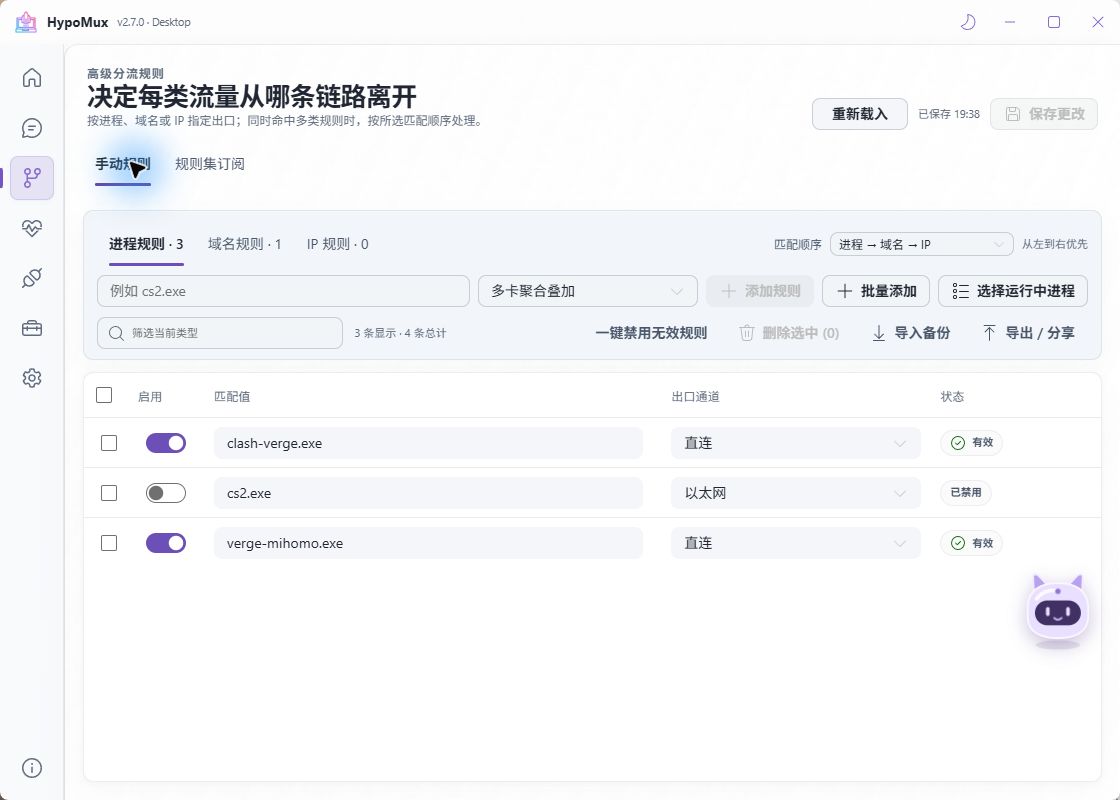
HypoMux can route by process, domain and subdomain, or destination IP / CIDR. Each rule can use aggregation, direct access, Ethernet, Wi-Fi, or a specific adapter.
Rules are managed from the Routing Rules page. New and edited rules normally affect connections made afterward, so reconnect the affected app or restart it when necessary.
Scope
Manual rules and subscriptions are loaded by TUN mode. Saving in System Proxy mode does not prove an app is direct or blocked. Verify fresh connections, and restart TUN when prompted.
Use subscriptions for categories of domains/IPs. The built-in AI assistant can query and edit individual rules; use dedicated pages for files and subscriptions.
Add a rule
- Select a match type: process, domain, or IP / CIDR.
- Enter the value: an executable filename, domain, or IP address/network.
- Choose aggregation, direct, a specific adapter, or reject. Reject blocks matching new connections; check its target and priority.
- Save, then establish a new connection and verify the result.
Use the actual executable name; a game launcher and its game may be separate processes. Enter a domain such as example.com without a scheme, port, or path. IP / CIDR examples are 192.0.2.1 and 192.0.2.0/24. These demonstrate syntax, not rules to add unchanged.
For example, route steam.exe to aggregation for concurrent game updates, while routing a game or meeting app directly to preserve its original latency path.
Match order
One connection can match several rule types at once — a process may have a process rule while the domain it contacts has a domain rule. Match order decides which one wins.
The Match order control in the rules toolbar sets the priority of the three rule types. The default is process → domain → IP. The setting saves automatically and is kept even when the rule list is empty.
- To control outbounds per application, keep the default process-first order.
- To make a domain use the same outbound no matter which program reaches it, move domain ahead of process.
- Among domain rules of equal priority, a more specific subdomain matches before its parent domain.
Changing the order changes existing results
Match order is a global setting and affects existing rules, not just new ones. Reconnect the affected apps after changing it and confirm the outbound in Connections.
Enable, disable, and bulk actions
The Enable switch in the rules table suspends a rule without deleting it. A disabled rule takes no part in traffic matching or outbound availability checks, and the list shows its state. When you are testing whether one rule causes a side effect, disabling is safer than deleting.
Disable unavailable rules in the toolbar suspends every rule that points to an adapter outbound that is currently unavailable. After swapping adapters, unplugging a cable, or dropping a hotspot, this restores a working state quickly; re-enable the rules manually once the adapter returns.
Bulk-updating the outbound of conflicting rules preserves each rule's existing disabled state.
Understand outbound policies
| Outbound | Behavior | Keep in mind |
|---|---|---|
| Aggregation | Uses the current scheduler to select a pooled adapter | Assigns connections; does not split one connection |
| Reject | Blocks matching new connections | Applies through TUN routing; does not terminate the app or replace the system firewall |
| Direct | Bypasses aggregation scheduling and follows system routing | Does not guarantee Ethernet or avoidance of mobile data |
| Specific adapter | Uses the selected egress for matching traffic | Confirm that the adapter is online and reaches the target; do not guess internal adapter IDs |
Add from Active connections
Find a process or connection and use its routing shortcut. Review the executable, match value, outbound, and conflicts before saving, then reconnect the app. If configuration changed elsewhere, reload instead of overwriting newer edits from another page or AI.
Save and import the JSON
- Before editing or importing, select Export backup in Routing Rules to preserve the current rules.
- Save the new content as a UTF-8
.jsonfile, such ashypomux-routing-rules.json, without Markdown fences or explanatory text. - Select Import backup, choose the file, review validation results and the replacement prompt, then confirm.
- Reconnect the affected app and verify its outbound in Connections. Import your previous backup if you need to restore the old rules.
Import replaces; it does not append
Confirming import replaces the entire current rule set with the file's rules. A rule backup is not a full settings backup. Review even an empty rule file before confirming it.
Recheck specific-adapter selections when transferring rules to another computer. AI does not know your internal adapter IDs; select the adapter in the app after importing if needed.
Backup format version
Exported backups now use format version 3, which stores the match order alongside the rules. Importing older version 1 and 2 backups is still supported; the type match order is restored from the priorities in the old backup.
Export an old-format backup before planning a rollback
v2.5.9 and earlier cannot import a format version 3 backup. If you may roll back after upgrading, export and keep a rule backup from the older version first.
Ask AI to help design rules
If you are unsure which apps should aggregate or route directly, you can ask your preferred AI assistant to analyze your use case. Treat its answer as a draft: review every rule, add it in HypoMux, and verify it with new connections.
What to tell the AI
- The apps or services that need network access, such as download managers, launchers, games, and meeting apps.
- Your goal: higher download throughput, lower game latency, or pinning a service to one adapter.
- Connected adapters and their roles, for example “Ethernet is stable; mobile data is limited.”
- Whether a VPN, TUN, local proxy, or accelerator is running.
- The output format you need: an importable HypoMux JSON rule file.
Copy this prompt
I use HypoMux on Windows and want help designing routing rules.

My network and requirements:
- Connected adapters: {for example: Ethernet, Wi-Fi, mobile hotspot}
- Main goal: {for example: aggregate Steam downloads while keeping games and voice low latency}
- Apps or services to handle: {for example: steam.exe, game executable, Discord}
- VPN, TUN, proxy, or accelerator currently in use: {write “none” if not applicable}

If required information is missing, or a process name, domain, or IP is uncertain, ask me first. Do not put "needs confirmation" placeholders into rules.
Once confirmed, output one importable HypoMux JSON object only, without Markdown fences, comments, or explanatory text.
Use this exact format. Only use aggregation (multi-network aggregation) or direct as the outbound policy.
Use only process, domain, or ip for match_type, and one confirmed matching value per rule.

{
  "format": "hypomux-routing-rules",
  "version": 3,
  "rules": [
    { "match_type": "process", "value": "example.exe", "outbound": "aggregation" }
  ]
}

Do not suggest bypassing access controls on any website, service, or network. Do not treat example.exe as one of my actual apps.
Review each generated rule, then follow Save and import the JSON. Do not overwrite existing rules without a backup.
Example
“I have Ethernet and Wi-Fi. I want Steam updates to download as quickly as possible, but
game.exe, Discord, and meeting apps should keep low latency. I do not use a VPN or another TUN. Return importable JSON in HypoMuxhypomux-routing-rulesv3 format and use onlyaggregationanddirectoutbounds.”
Review before use
Do not share account details, passwords, access tokens, full public IPs, raw logs, or other sensitive data with an AI assistant. AI cannot see your live network environment and does not replace Network Check, connection verification, or your final review.
Recommended policy
- Use aggregation for download managers, game launchers, and large browser downloads.
- Use direct routing for competitive games, voice, and video meetings.
- Let per-NIC blocked domains record and avoid a domain that one link cannot reach, so later connections are not assigned to the same path. The feature is off by default and targets campus and corporate networks.
Third-party proxies and accelerators
HypoMux attempts to identify common local proxies and game accelerators and establishes direct bypasses to reduce proxy loops. Keep these boundaries in mind:
- Do not let two programs take over the Windows system-proxy switch at the same time.
- If another program's TUN / VPN has taken the default route, stop it before starting HypoMux Virtual Adapter mode.
- After third-party tool updates, check compatibility notices and support logs before changing modes.
WARNING
Rules do not bypass access controls set by websites, services, or networks. Use them only on devices and networks you own or are authorized to use, and comply with the relevant service rules.