Quick start
Before you begin
- Use Windows 10 or Windows 11. If HypoMux is not installed, complete Install and verify first.
- Prepare two or more independent internet connections, such as Ethernet plus Wi-Fi, or broadband plus USB tethering.
- If you use a VPN, local proxy, or game accelerator, read routing rules first.
Explore without starting
Home, rules, tools, and settings can be reviewed while the network service is stopped. During remote work or an important conversation, wait until network changes are acceptable. Do not start TUN, sharing, or apply MTU just to obtain a running screenshot.
1. Connect two or more networks
Each adapter added to the aggregation pool should have a valid IPv4 address, gateway, and DNS configuration. Complete any captive-portal login separately for each network and confirm that all connections can stay online together.
Two adapters connected to the same router still share its broadband capacity. Mobile tethering uses your mobile-data allowance when backed by cellular data. See the FAQ.
2. Choose the adapters to aggregate
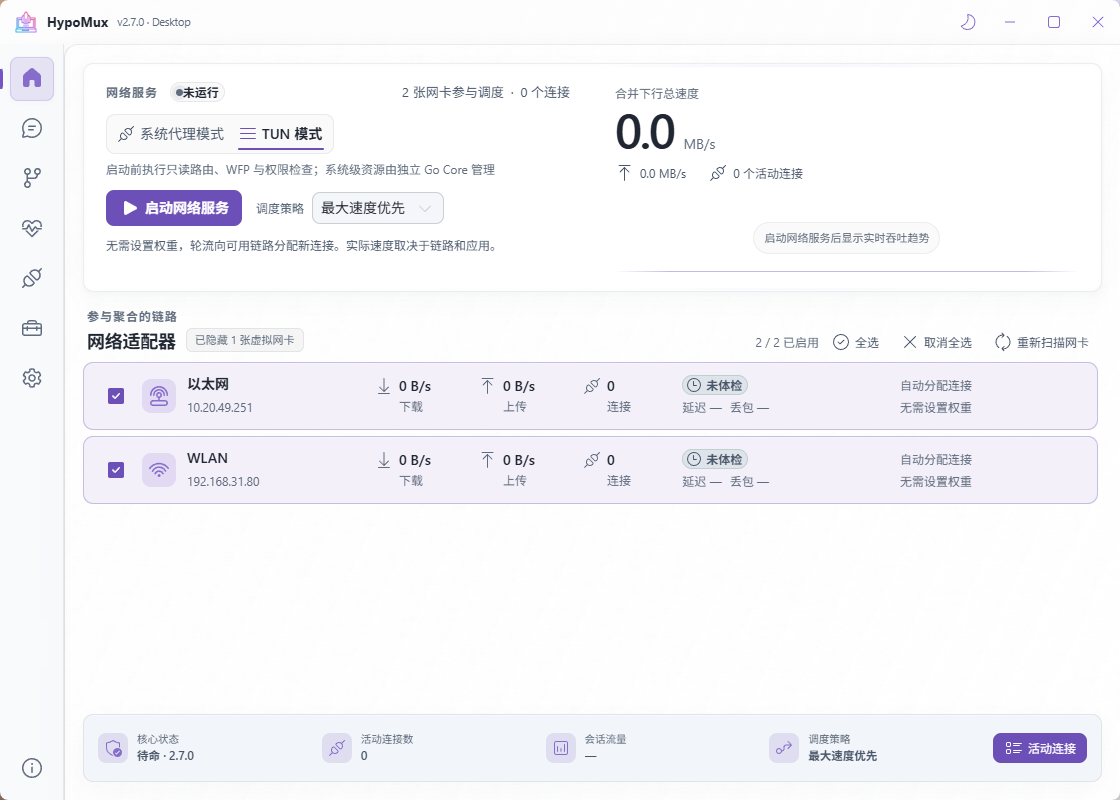
Open HypoMux, refresh adapter status, and select the active adapters to include. Run Network Check first to confirm reachability and source-address binding.
If an adapter does not appear, ensure that it is connected, enabled, and has an IPv4 address, then refresh. Do not choose adapters that are LAN-only or do not have an internet gateway.
3. Select a mode and start
Choose System Proxy or Virtual Adapter mode, then start the aggregation engine. If Steam is already open, restart it when prompted so it can fully apply the proxy configuration.
Start with System Proxy mode for a first test. Use Virtual Adapter mode only when you need apps that cannot use a proxy. See connection aggregation.
4. Start a multi-connection download
Use a browser, download manager, or game launcher to begin a task that makes several concurrent requests. Total throughput depends on the source server, every network path, concurrency, storage, and CPU.
Open Connections to confirm that new connections are distributed across selected adapters. Compare the same task before and after starting HypoMux.
5. Stop cleanly
When finished, click Stop, wait for the engine to stop, and then close HypoMux. This lets it immediately restore any system proxy and network settings it took over.
Next steps
- No speed improvement or only one active path? Follow Troubleshooting.
- Need to adjust each path's share of new connections? Read Scheduling strategies.
- Need a fixed path for games, meetings, or another app? Configure Routing rules.